
Getting from A to B on the road is not just about getting there; it is about doing so comfortably, safely, and without losing connection. That’s where a reliable car adapter makes all the difference. Whether you’re charging your phone for navigation, streaming music, or powering up before the next stop, having the right adapter for your vehicle can save you a lot of hassle.
Here we will explore why compatibility is important, how to make sure your car adapter fits your device as well as your car, and what features you need to look for when choosing the best car adapter.
Why Compatibility Matters
You might assume that any adapter will work just fine, but unfortunately, that’s not always the case.
Here’s why:
- Different vehicles have different power systems or outlet types (looked like the traditional 12V cigarette lighter, or newer USB ports).
- Devices (phones, tablets, GPS units) expect certain voltages, currents, or USB-C/USB-A ports.
- A mismatch can lead to slow charging, heat built-up, or even not working at all.
So if you’re searching for a reliable car charger adapter, it’s worth taking a moment to check that the unit you pick is well matched to your vehicle and your device. Think of it as fitting the right piece to the right puzzle.
Know Your Vehicle’s Outlet and System
First step: What kind of power outlet does your vehicle have? Most cars have what used to be called a cigarette lighter socket ( 12 V), and many newer models might offer USB-A or USB-C ports built in. Some EVs or newer cars may even use 24 V systems.
When you buy a car adapter usb c, ensure it’s built for the voltage and socket you have. If your vehicle provides a 12 V socket, plugging an adapter meant for 24 V won’t work well ( and vice versa). Also, check whether your vehicle has a built-in USB port: some of these supply less current than an aftermarket adapter, meaning slower charging.
Match the adapter to your device
Once you know your car’s outlet, the next step is your device. If you’re using an iPhone (or iPad) vs an Android phone, the adapters look the same, but the requirements may differ:
- For an iPhone car adapter, make sure the adapter supports USB-C or Lightning as appropriate and includes enough current (Amps) to charge effectively.
- For an Android car adapter, if your phone supports USB-C Power Delivery (PD) or Qualcomm Quick Charge, you’ll want an adapter that supports those standards.
If you plug a high-power smartphone (one of the newer ones) into a weak adapter, it might charge extremely slowly or even fail to keep up when you’re using GPS or music. Conversely, if the adapter isn’t well insulated or built for your vehicle’s power system, you might risk heat, damage or unpredictable behaviour.
What to look for when choosing the best car adapter
Here are some features and checks to help you pick a good one:
1. Output ratings – Look at the labelled current ( e.g., 2.4 A, 3.0 A ) and voltage. A higher rating means better support for devices that demand more power.
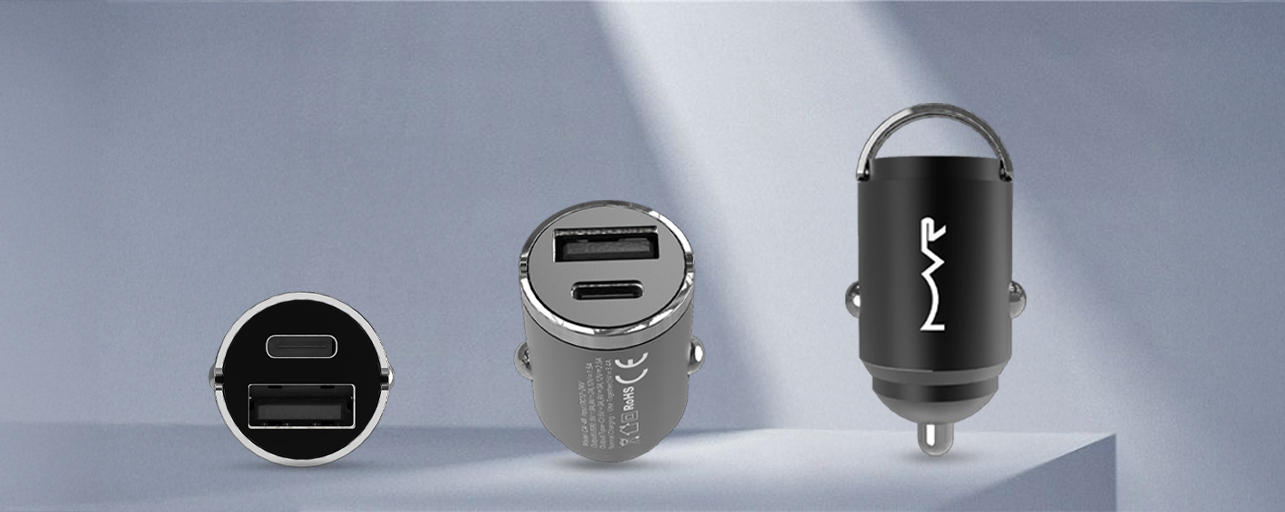
2. USB type and compatibility – Does it have USB-C, USB-A, or both? If it’s labelled ‘USB-C car adapter’, you can plug in devices with USB-C directly ( or use a cable). If you’re using an iPhone with a Lightning port, make sure the cable supports fast charging through the adapter.
3. Power delivery or fast-charge support – Many newer devices use USB-C PD (Power Delivery) or Quick Charge. If you want your device to top up fast, go for an adapter that supports these.
4. Vehicle compatibility – Ensure the adapter is rated for your car’s socket (e.g., 12V). Also, check the build quality: good adapters will have protection for overcurrent, overtemperature, and short-circuit.
5. Multiple device support – If you’re carrying passengers or want to plug in both phone and tablet, get an adapter with multiple ports. Make sure each port outputs enough power for the device it serves.
6. Cable quality matters too – Even the best adapter won’t perform if the cable is too thin, long, or low quality. For optimal charge speed, pick a matching high-quality cable.
Practical tips for use
- Always unplug devices when the car is off. Some adapters draw a small current even when idle, which can slowly drain your vehicle battery.
- Avoid leaving the adapter in the socket when not in use; heat can build up and shorten the lifespan.
- In hot weather (especially in Australia), make sure the adapter and plug aren’t blocked by direct sun or heavy loads; good ventilation helps.
- If you often use GPS + music + charging at once, your device and adapter will heat up more. That’s fine unless it becomes hot to touch: if so, reduce load or use a mount that doesn’t trap heat.
- If your vehicle has a built-in USB port but devices charge slowly, consider upgrading to a dedicated 12 V socket adapter with higher output.
Unplug devices when the car is off, avoid heat build-up, ensure good airflow, and use a high-output 12V adapter for faster, safer charging.
Final thoughts
Choosing the best car adapter isn’t just about picking the most expensive one or the one that looks fancy. It’s about making sure the adapter fits your vehicle’s outlet and power system, and matches your device’s charging needs. Whether you’re searching for a car charger adapter for your Android or an iPhone car adapter for your iPhone, compatibility is the key.
While selecting a good quality car-charging solution, you can trust MVR Store to support you every step of the way. MVR offers a wide range of quality accessories designed for modern vehicles and mobile devices, whether you’re looking for a sleek car charger adapter, a top-tier USB-C car adapter, or options that support both iPhone and Android systems. Our commitment to compatibility means you can hit the road with confidence, knowing you can hit the road with confidence, knowing your gear is designed to keep your device powered, safe and ready for whatever your journey brings.
FAQs
How do I know if a car adapter is compatible with my vehicle?
Check your vehicle’s power outlet first. Most cars use a 12 V cigarette lighter socket, while some trucks or EVs use 24 V. Match your adapter’s voltage and connector type (USB-A or USB-C) to your car’s outlet. If your vehicle only has built-in USB ports, confirm the speed before buying an additional car charger adapter.
What’s the difference between a USB-A and a USB-C car adapter?
A car adapter USB-C supports faster charging and newer devices, while USB-A is the traditional rectangular port used for standard cables. Many modern adapters include both, so you can charge multiple devices at once, one for newer and one for older cables.
Can I use the same car adapter for iPhone and Android phones?
Yes, if the adapter has both USB-C and USB-A outputs. For an iPhone car adapter, ensure it supports Lightning or USB-C PD fast charging. For an Android car adapter, look for Qualcomm Quick Charge or PD 3.0 support. The cable type also affects charging speed, so use an original or certified cable.
What’s the ideal wattage for a car adapter USB-C?
For most modern phones, look for a USB-C car adapter rated between 20W and 45W. Higher wattage means faster charging for tablets and newer phones. If you plan to charge laptops or power-hungry devices, pick an adapter that supports 60W or higher PD outputs.
Can a car charger damage my phone battery?
Not if you choose a quality adapter with built-in safety protections such as over-current, over-temperature, and short-circuit protection. Cheap or unregulated chargers may cause battery wear over time, so always go for reputable brands when buying your car charger adapter.